Vendor Payment Flow via Isabel - No Bankconnection
This document describes the recommended process for paying vendor bills from Odoo 19 via SEPA XML, sending the XML to Isabel, and reconciling payments afterward without an online bank connection.
The target process is:
Vendor bill -> SEPA payment batch/XML -> Isabel approval/payment -> manual bank statement import or manual bank transaction -> reconciliation in Odoo
Step A - Create and post the vendor bill
Go to:
Accounting -> Vendors -> Bills
Create and post the vendor bill as usual.
Before posting or paying, verify:
• The vendor is correct.
• The vendor bank account is filled in and trusted.
• The bill amount is correct.
• The payment term is correct.
• The bill is posted.
Step B - Register the payment using SEPA Credit Transfer
Open the posted vendor bill and click:
Pay
Use the following values:
|
Field |
Value |
|
Journal |
Bank |
|
Payment Method |
SEPA Credit Transfer |
|
Payment Date |
Planned payment date |
|
Amount |
Amount to pay, for example 116.62 EUR if an early-payment discount applies |
|
Memo / Communication |
Invoice reference or structured payment communication |
Confirm the payment.
For multiple bills, use:
Accounting -> Vendors -> Bills -> select bills -> Action -> Register Payment
Then choose SEPA Credit Transfer.
Step C - Create the payment batch and XML
Go to:
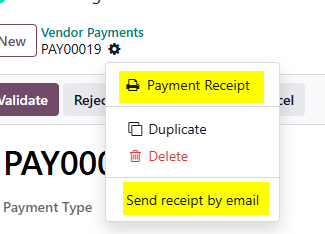
Accounting -> Vendors -> Payments
Then:
1. Select the SEPA payments to include.
2. Use Action -> Create Batch Payment.
3. Open the created batch payment.
4. Validate the batch payment.
5. Download the generated SEPA XML file.
6. Send the file to the Finance manager which will do the payment in Isabel.
Step D - Finance Manager does payment in Isabel
Generating the XML does not prove that the money has left the bank account.
Note: It only means: Odoo created a payment instruction file.
After the finance manager uploads and approves the XML in Isabel, Odoo still needs the actual bank movement to complete the accounting process.
Since there is no online bank connection, there are two options.
Option A - Recommended: import the bank statement manually
Ask Finance or Accounting to export the bank statement from Isabel or the bank portal, preferably as one of the following formats:
• CAMT.053 / CAMT.054
• CSV
• XLS/XLSX
• CODA, if supported by the localization/setup
• Another supported bank statement format
Then in Odoo:
Accounting -> Dashboard -> Bank journal -> Import / New Transaction / Statement
Import the bank file and then reconcile the bank statement lines.
This is the best approach because it uses the actual bank confirmation.
Option B - Manual bank transaction entry
Then reconcile that bank statement line against the outstanding payment created by the registered SEPA payment, not against the vendor bill again if the payment already exists.
Example:
|
Field |
Value |
|
Date |
Actual bank payment date |
|
Partner |
Vendor |
|
Amount |
Negative payment amount, for example -116.62 EUR |
|
Label |
Invoice reference or batch reference |
Then reconcile this manually entered bank transaction with the outstanding SEPA payment.