Link a document - User flow
This is a system to easily link documents to a delivery note.
On your PC you can save the documents in the folder you got from ePack support. This folder is different for each entity.
By saving the files to be linked with reference to the delivery note (bl) in the name, epack automatically assigns this file from this path to this shipment in the add documents screen.
The link document screen can be found using this path:
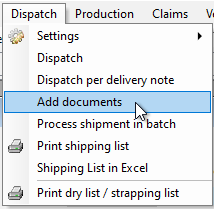
When the document is linked to a delivery note it is moved to another folder in the background, so it is not in the overview anymore.
2/ Alternatively, you can also select the delivery note and assign a file from a temp folder that is shared in the user's cloud environment.
After processing, the file will also dissappear from the temp folder.
Link in Dispatch is also possible from this same temp folder:
Attention, all files that are linked this way, will be printed if the delivery note is printed!
the docs are displayd in search field => linke to invoicing and archive