COC registration
Sustainable growth and therefore sustainable sourcing are essential strategic pillars of the PGS Group. To achieve this, PGS has defined several KPIs (Key Performance Indicators), including the purchase of timber and timber-related products from PEFC or FSC certified companies.
In addition, the PGS Group has a PEFC multisite certificate, which means that we not only purchase PEFC-certified raw materials and products, but can also sell them.
Since only the invoice counts as a legally valid document within the framework of PEFC certification, correct registration is crucial.
This document1 aims to provide clear guidance on the allocation of a COC claim to PGS employees involved in the Chain of Custody process who work with ePack. This applies to the invoice check on the purchase side on the one hand and to the invoicing layout on the sales side on the other hand.
Definitions
COC -> Chain of custody = chain of custody
COC claim -> When a supplier sells the material with an FSC or PEFC claim, the supplier sells the wood-related goods with an FSC or PEFC sustainability certificate
PEFC claim -> PGS has a PEFC multisite certificate and also sells PEFC certified products to its customers. When a product is sold with a PEFC claim, it means that the product has the sustainability label. Please note: Only PGS RDB Baltic has an FSC certificate and can sell products with an FSC claim to its customers. Non-FSC certified entities can procure FSC products, but not sell them.
PEFC Multisite Certificate Number-> The number of the PEFC certificate. For the PGS RDB Pallets multisite certificate this is WOODBE-PEFC-COC-001631
FSC-> Forest Stewardship Council is an international non-profit organization dedicated to responsible forest management worldwide. FSC sets standards for sustainable forest management and certifies forests and products that meet these standards
KPI-> A KPI (Key Performance Indicator) is a measurable value that evaluates the performance of a company, process, or project.
PEFC-> Program for Endorsement of Forest Certification
Procurement
In contrast to previous versions, from 03/02/2025 onwards the COC registration will only be carried out at invoice control level and no longer at the receipt of goods and the entry of the wood delivery.
COC management per supplier in ePack
Within ePack, a record is kept at supplier level of the COC claim with which the supplier sells the materials. The various options can be consulted via the supplier sheet. In the Purchase invoice check, the correct COC claim can then be chosen.
This information is also used to verify the validity of the certificates and the sworn statements (see training "WI – QSE – PEFC training").
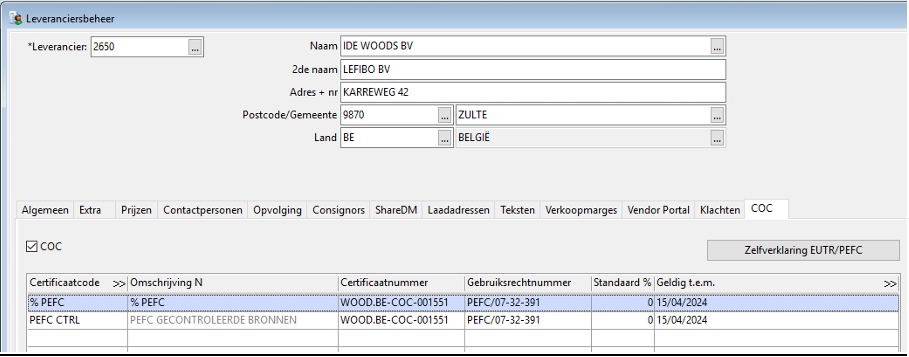
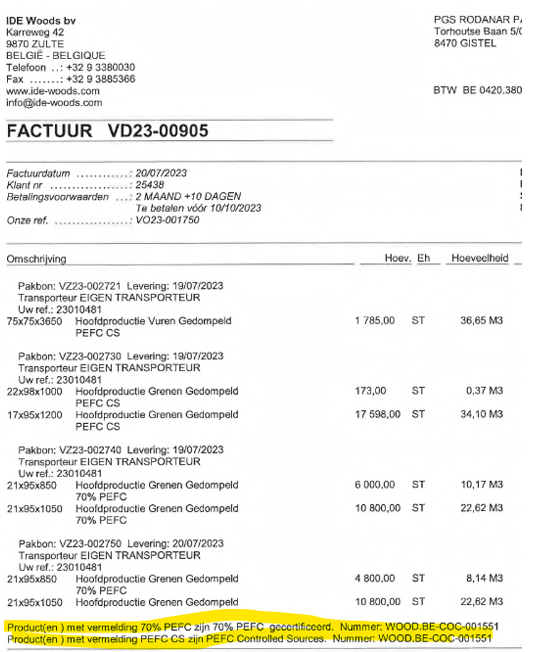
The supplier's invoice must contain valid2 COC information. It is based on the billing data that the correct COC claim must be selected in ePack.
If information is missing or there are uncertainties about whether or not a supplier supplies under COC certification, the Procurement Operations department3 should be contacted.
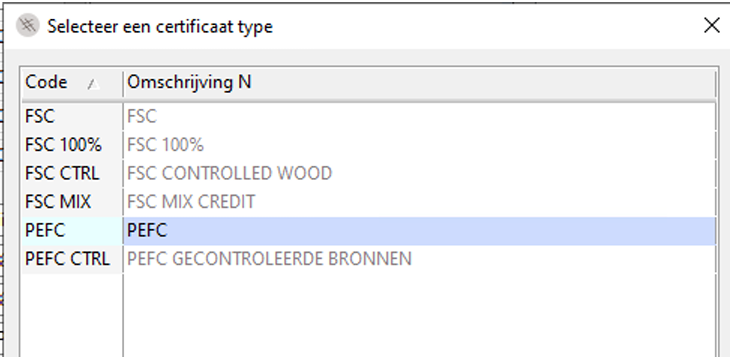
The 6 possible types currently defined within PGS and ePack:
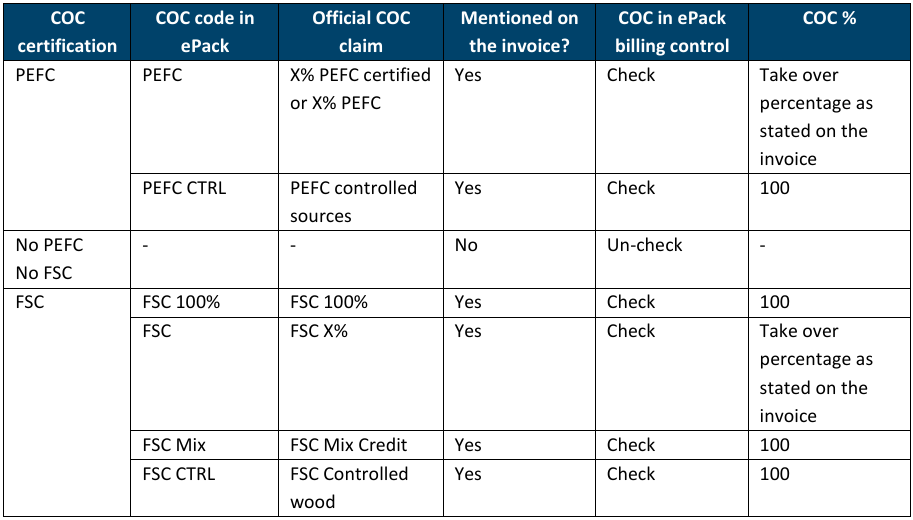
What do the different COC claims entail?
PEFC has 2 different options within ePack:
- PEFC: The percentage of claimed material is stated on the invoice and must be included in ePack. This percentage can be pre-filled at supplier level (if the same percentage is always invoiced) or left blank (0). It is strongly recommended to set the record to 0 to avoid incorrect automatic registrations.
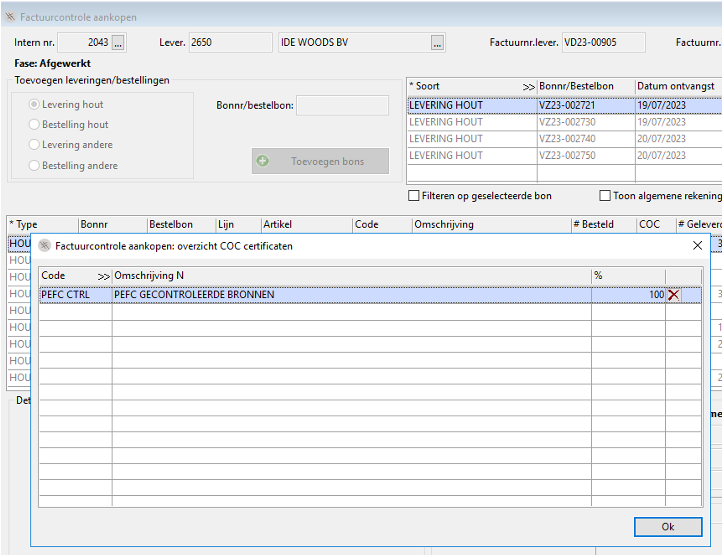
- PEFC CTRL: The percentage is always 100%, but is never mentioned on the invoice. For registration in ePack, this means that the entire volume is taken into account as a 'controlled source'.
FSC has 4 different types within ePack and the % is always 100:
- FSC 100% means 100% FSC certified.
- FSC without percentage means that a percentage must be registered. The percentage of claimed material is stated on the invoice and must be included in ePack. This percentage can be pre-filled at supplier level (if the same percentage is always invoiced) or left blank. It is strongly recommended to set the record to 0 to avoid incorrect automatic registrations.
- FSC MIX and FSC CTRL are registered as '100%', analogous to PEFC CTRL. The 100% is only used to calculate the volume, or 100% of the volume is considered 'controlled source'.
Example invoice with CoC information
Assignment via ePack : Log Order History
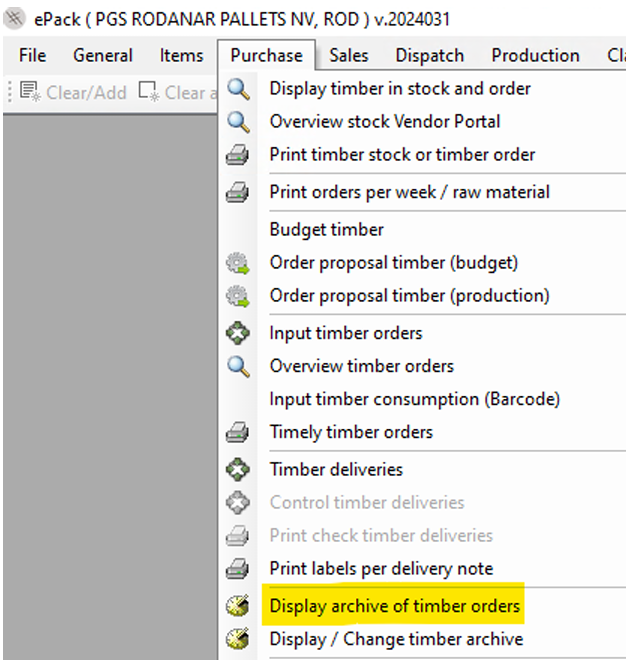
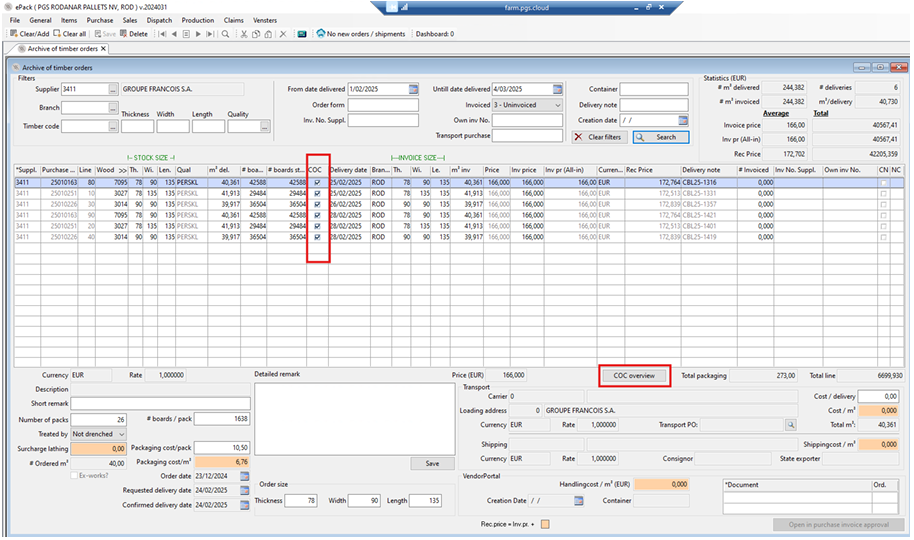
For the PGS sites that do not yet use the ‘ePack Purchase Invoice Check module’, the COC claim must be assigned via Purchase – Overview timber orders.
To do this, select the relevant delivery and click on the 'COC' field below the list of order lines:
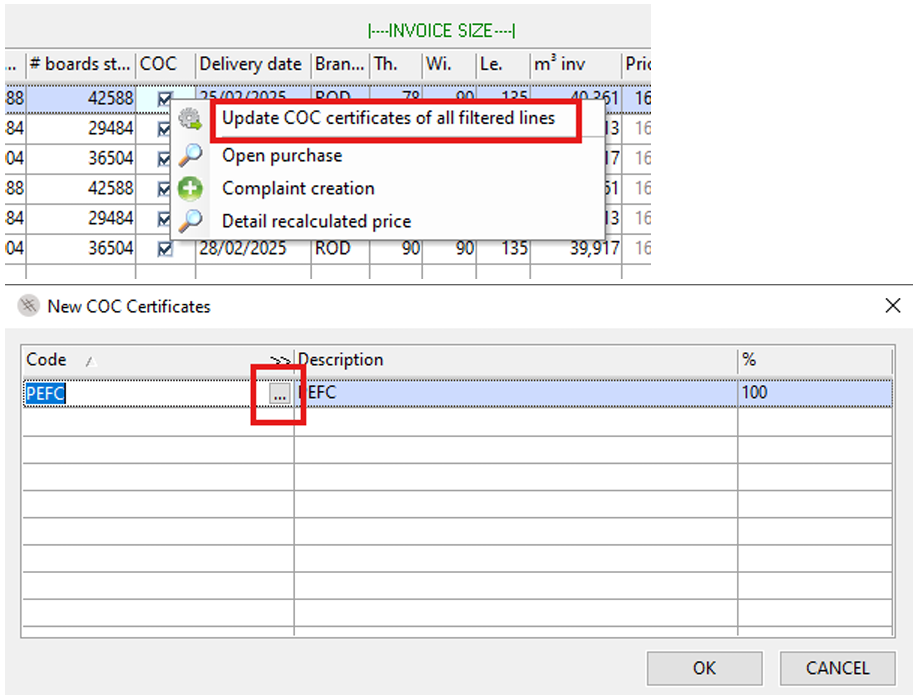
Via the RMB you will get the selection menu below containing the claim options specifically assigned to the supplier.
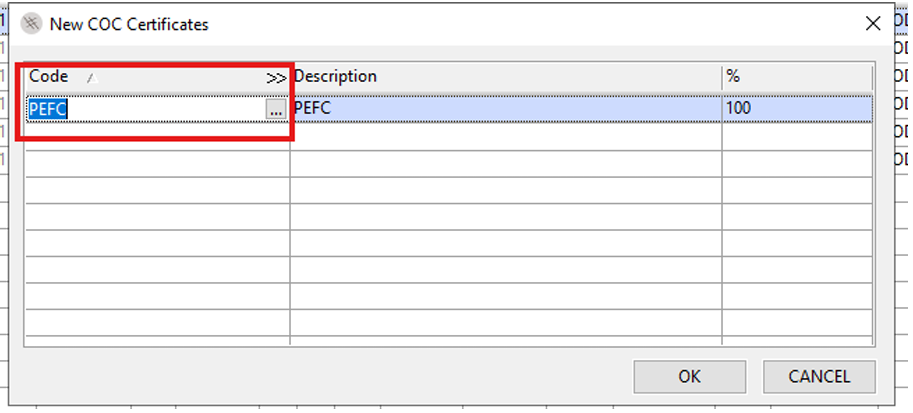
The COC stated on the invoice will be selected and the % must be adjusted – if applicable.
Assignment via ePack: Purchase invoice check
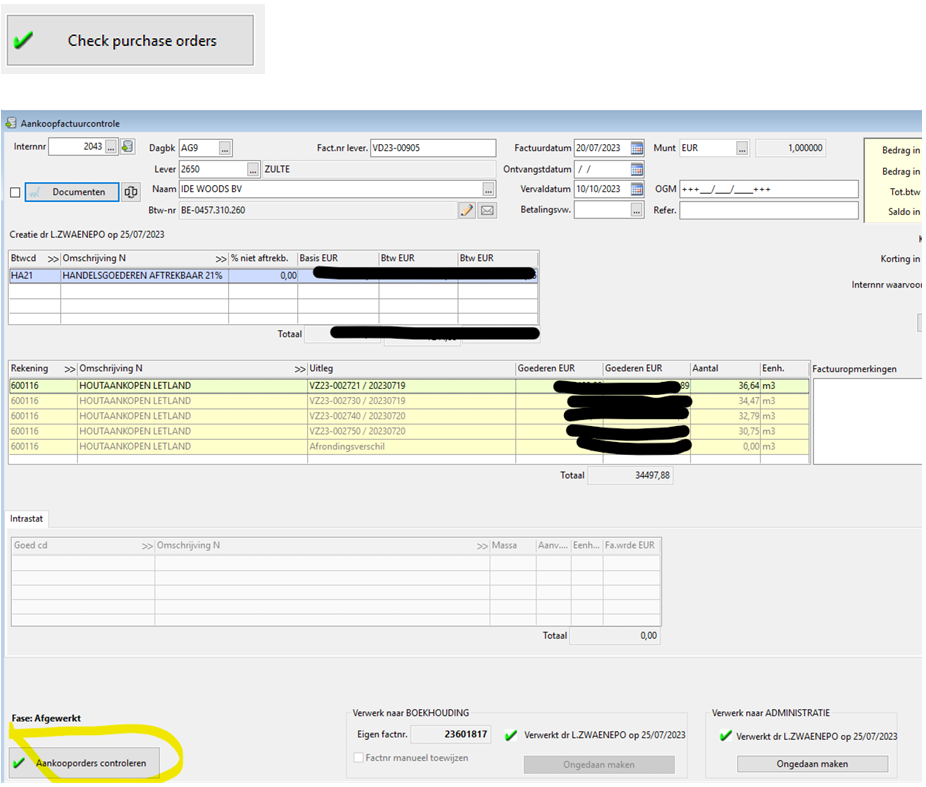
For the PGS sites that validate the invoices via the module in ePack 'Purchase invoice check', the COC claim must be assigned as follows: Select the invoice and click 'Check purchase orders' :
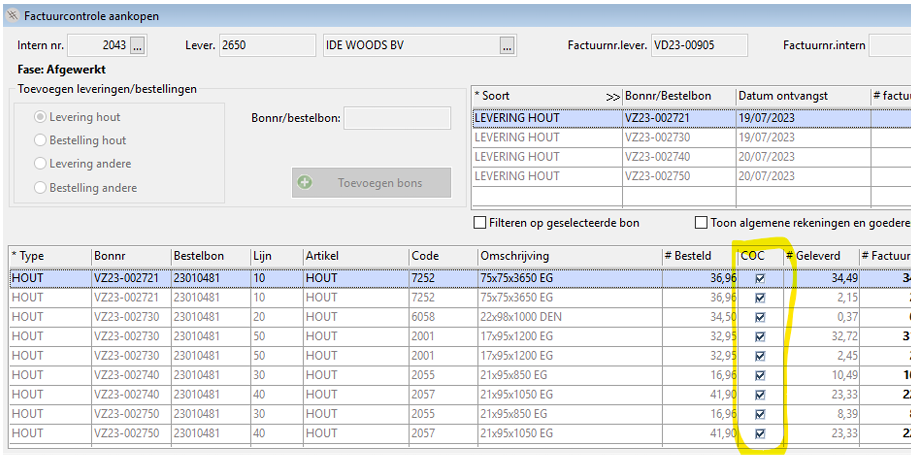
You have the detail per Receipt Number and per size, you can open and adjust the COC box via 'COC'.
You will get the same pop-up and procedure as described in 4.3.
In addition, it is also possible to assign the COC claim per delivery note. You can do this via the RMB in the detail overview of the delivery notes. Select per Delivery note/Order + RMB
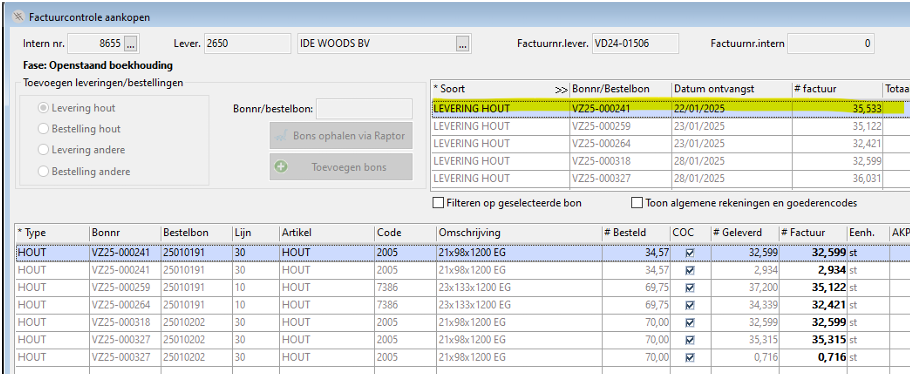
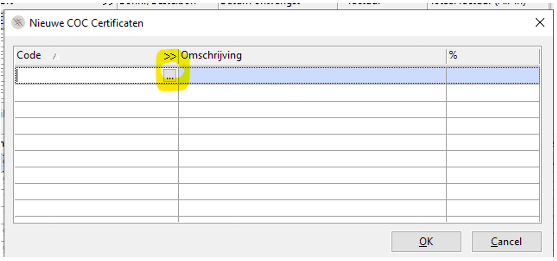
Click on the 3 dots 
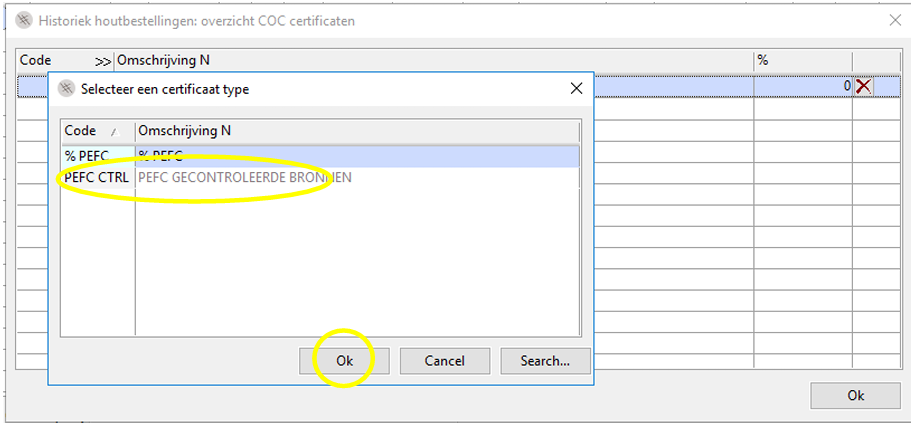
Select the correct code
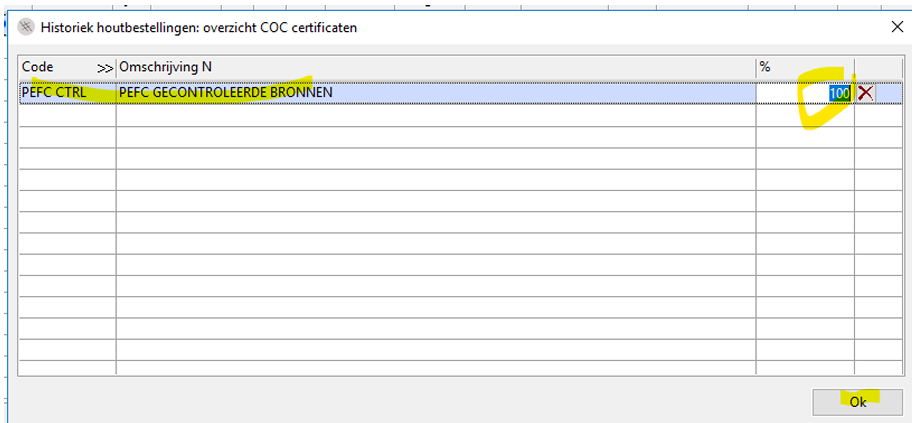
The COC stated on the invoice will be selected and the % adjusted – if applicable.
Deviating claim on the invoice and/or incorrect registration.
If the claim on the invoice is not reflected in the ePack selection menu, Procurement Operations5 must be contacted to investigate and resolve this. Until then, the invoice will not be processed for approval.
The entered COC is final, no adjustments can be made after processing the invoice. If an incorrect claim has been granted, Procurement Operations must be notified.
Sales
Some customers want to purchase PEFC-certified pallets, boards or by-products. Most PGS entities that offer PEFC certified products sell them 100% as PEFC.
In order for the products with a PEFC claim to be sold, both the customer and the product sold must be set as COC.
In order to distinguish these customers from customers who require non-PEFC-certified materials, the COC registration is included in the customer file. This is set up as follows:
- Go to ePack > Customers > Manage customers.
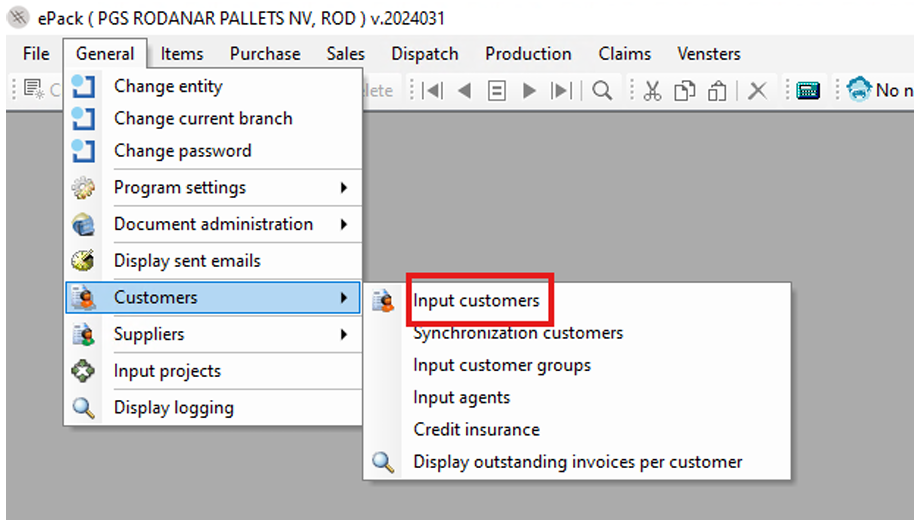
- Select the desired customer and navigate to the 'COC' tab.
- Tick 'COC' and fill in the table:
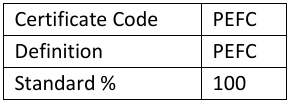
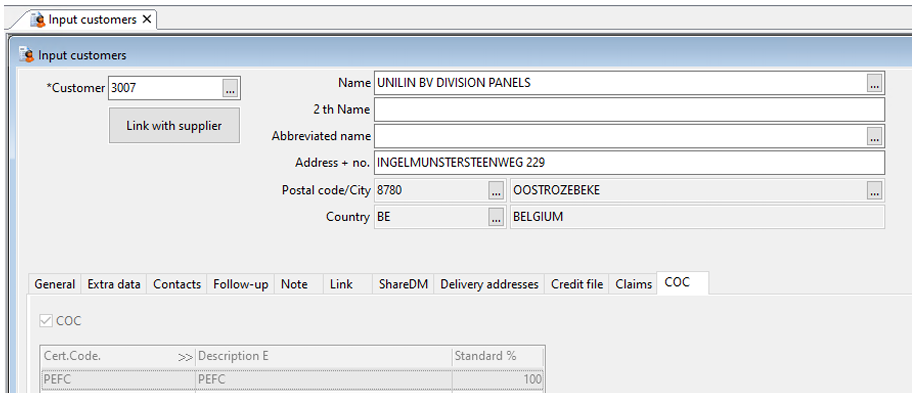
Sales composition
Compositions can be sold to different customers. At composition level, sales tab, price levels are6 added to the composition by the order team. Within a price line, customer-specific requirements are included, as well as the price that the customer has to pay. COC is also ticked at this level if the customer wishes to purchase the product with PEFC certificate.
Composition
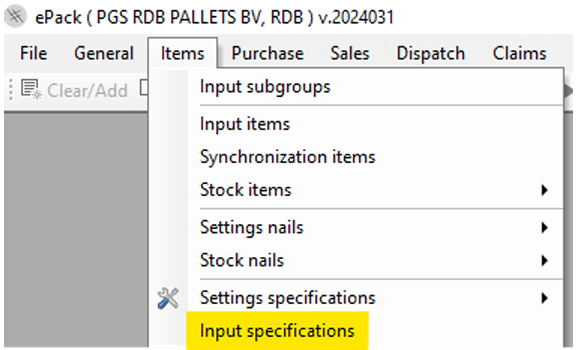
Go to items > Input specifications:
Enter the number of the composition in the ‘Specification’ field and click on the 'Sales' tab. Tick COC if the customer wishes to purchase the products with a PEFC claim.
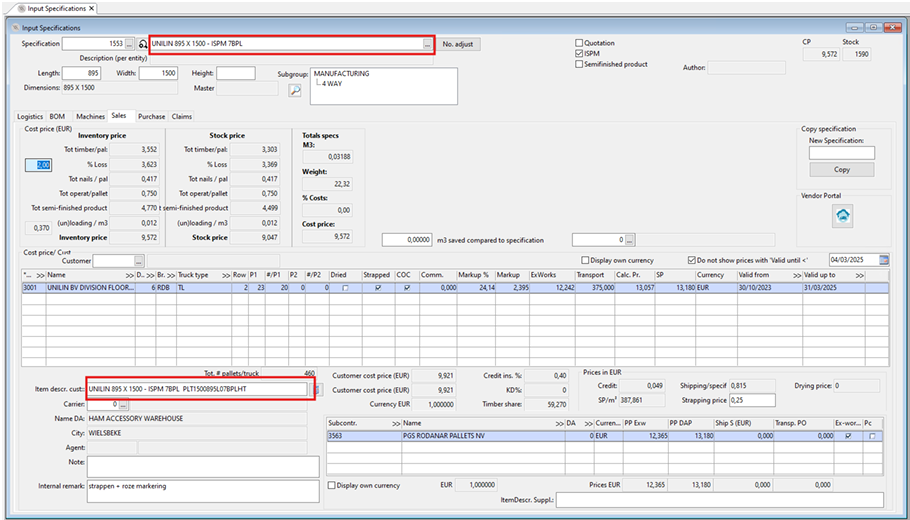
Attention:
The standard item description may differ from the item description that the customer sees on the invoice. Never mention the PEFC multisite certificate at article level with assemblies or wood codes. An exception applies to the sale of by-products. At the time of drawing up this work instruction, by products in ePack are programmed differently than compositions and wood codes. Therefore, for by products, the percentage by which the products with PEFC claim are sold must be entered at item level, according to 'WI – QSE – COC Claims Official'. It is not necessary to state the PEFC multisite certificate number.
Entry of sales
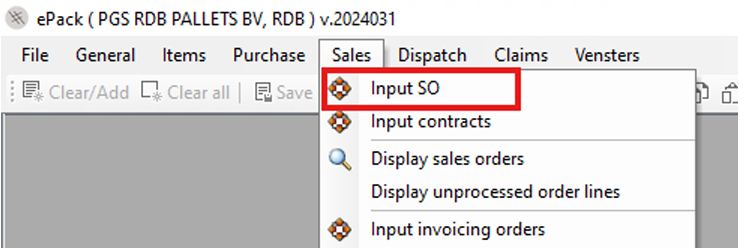
Go to Sales > Input SO:
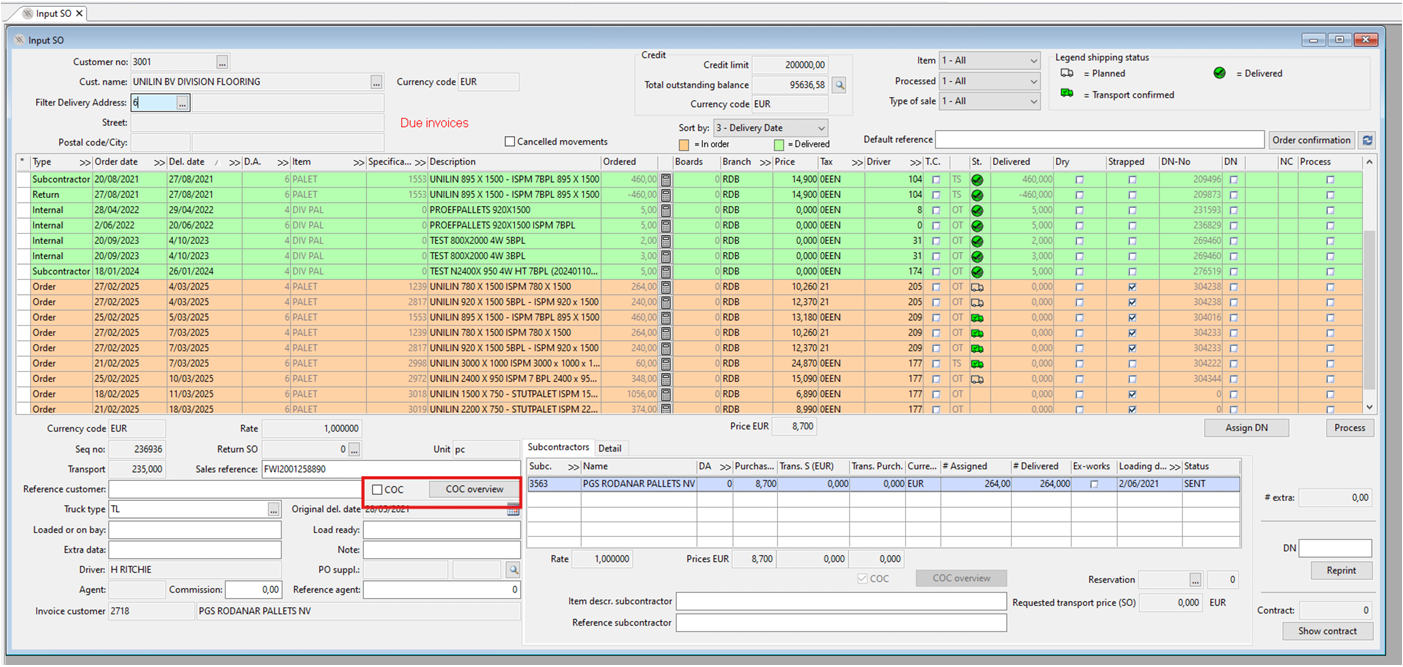
Create a new order line . If COC is registered on the customer sheet and/or COC is checked on the price line at composition level, COC is automatically checked. If this is not the case and the customer still wants to purchase PEFC-certified products, I will check this COC screen.
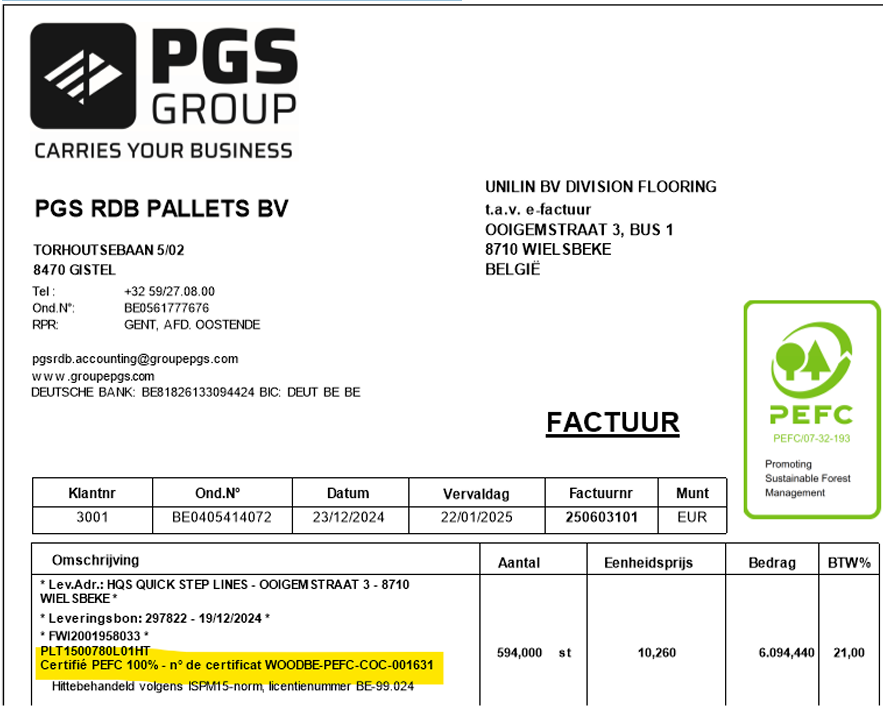
The PEFC claim will appear on the relevant invoice:
Sale of timber code
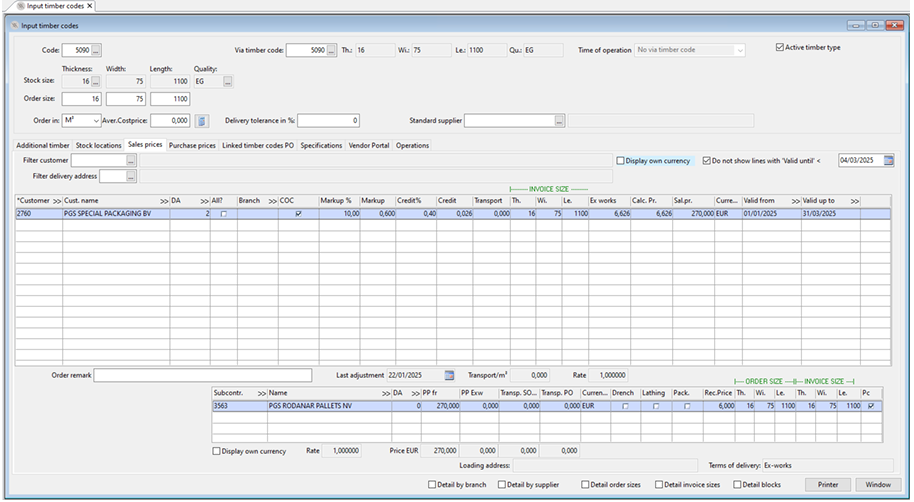
The principle for the sale of boards is the same as for the sale of an assembly. However, price lines per customer are added at the wood code level and not at the composition level.
Wood Code
Go to ePack > Articles > Enter wood code:
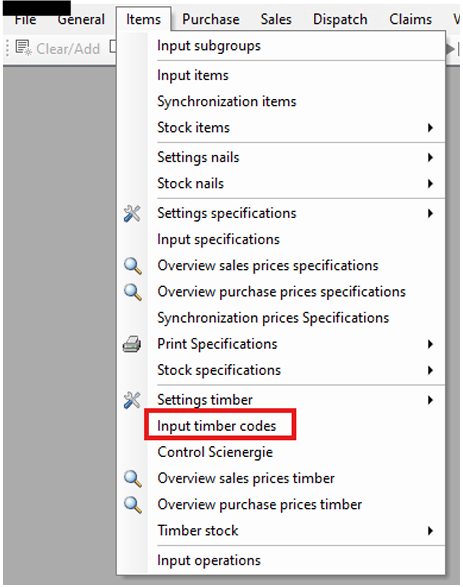
Enter the timber code, navigate to the 'Sales prices' tab and create a price level. Check COC in the price line.
Entry of sales
Follow the steps according to 5.1.2. and the PEFC claim will also be fine on the invoice.
